Pet-Finder Architecture
A minimalist approach to pet safety. This system avoids central database accounts, operating entirely on cryptographic proofs using hardware Passkeys, recovery phrases, and hidden URL keys.
Architectural Breakdown & Cryptographic Lifecycle
This system is designed so the server never knows the owner’s private phone number. By using client-side encryption (AES-GCM) and URL hashes (#), the database only stores encrypted text. Instead of a password, the owner controls the pet’s status using a secure device Passkey or a backup recovery phrase.
Scenario 1: Initialization & Tag Deployment (Owner Setup)
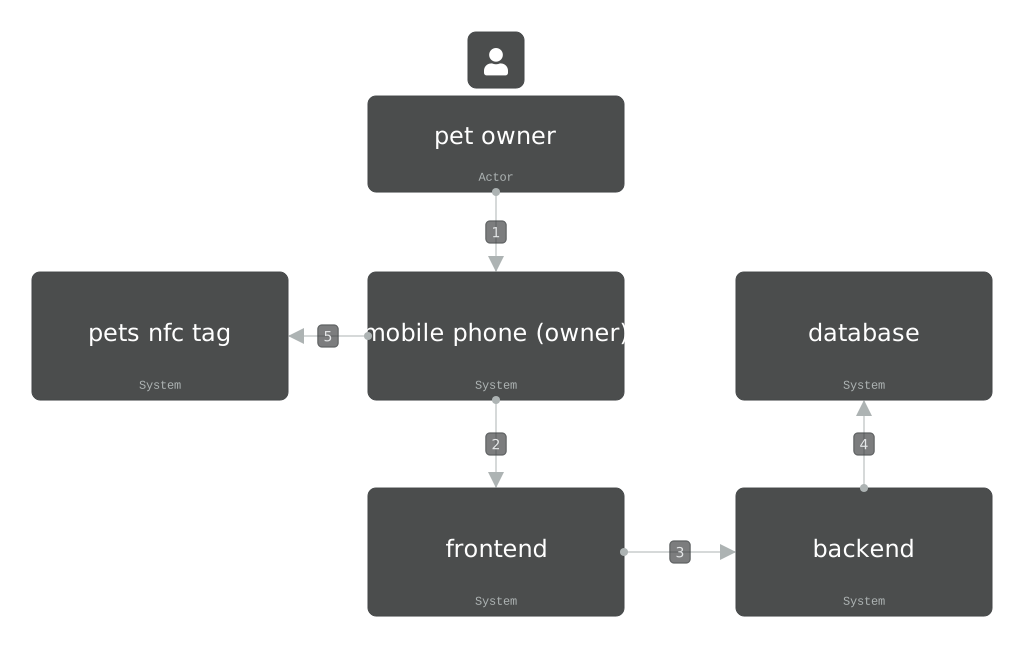
This workflow shows how an owner sets up a new tag without creating a traditional account.
- Step 1:
[pet owner → mobile phone (owner)]The pet owner opens the web app and enters their phone number into the user interface. - Step 2:
[mobile phone (owner) → frontend]The frontend generates a uniquepet_id, a symmetric key (sym_k), a primary keypair (pk1 / sk1), and a backup keypair (pk2 / sk2). - Step 3:
[Lokal im frontend]The frontend encrypts the phone number withsym_k. It then triggers the browser to register a secure hardware Passkey on the device usingsk1. For backup (e.g., if the browser cache is cleared), it generates a recovery phrase or a backup QR code fromsk2. - Step 4:
[frontend → backend]The frontend sends an HTTPS POST request to the backend containing only:pet_id, the encrypted phone number,missing = 0,pk1, andpk2. The encryption keysym_kand the private keys (sk1,sk2) are never sent to the server. - Step 5:
[backend → database]The backend saves thepet_id, the encrypted data, the status flag, and both public keys (pk1,pk2) into the PostgreSQL database. - Step 6:
[pet owner + mobile phone → nfc tag]The owner writes the URL to the NFC tag or prints it as a QR code. The exact URL format is:https://pet-finder.yakyaz.dev/scan/[pet_id]#[sym_k].
Changing Status to Vermisst (Missing)
To mark a pet as missing, the owner opens the dashboard. The app requests authentication via the device’s Passkey (sk1) or the backup recovery phrase (sk2). The frontend signs a “missing” command payload. The server verifies this signature against pk1 or pk2. If valid, the database updates the status to missing = 1.
Scenario 2: Recovery & Decryption (Finder Scan Loop)
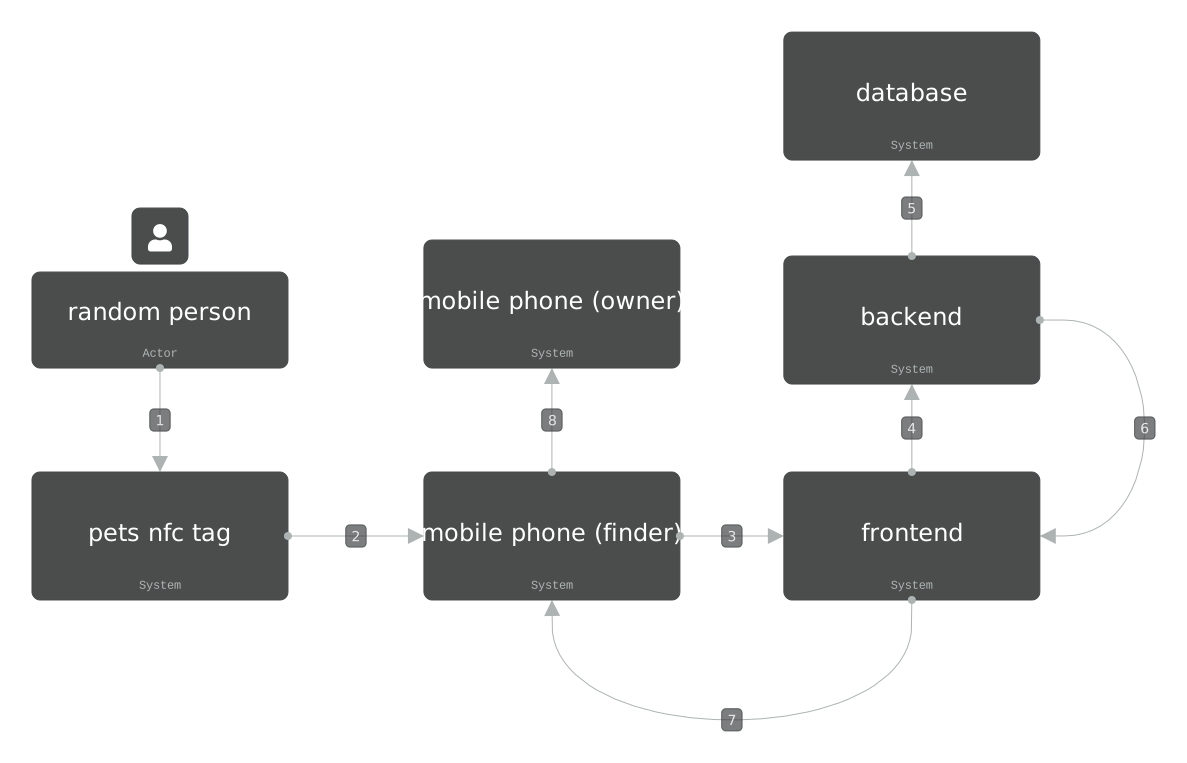
This flow happens when someone finds a lost pet and scans the tag.
- Step 1:
[random person → nfc tag]The finder scans the NFC tag or the QR code with their mobile phone. - Step 2:
[nfc tag → mobile phone]The tag opens the URLhttps://pet-finder.yakyaz.dev/scan/[pet_id]#[sym_k]in the finder’s mobile browser. - Step 3:
[mobile phone → frontend]The browser loads the webpage. Because the keysym_kis located after the#symbol in the URL, the browser keeps it strictly local. It is never sent over the network to the server. - Step 4:
[frontend → backend]The frontend sends an HTTPS GET request to the backend containing only thepet_id. - Step 5:
[backend → database]The backend checks the database for the status of the requestedpet_id. - Step 6:
[backend → frontend]The server evaluates the status. If the status is0(Normal), the server blocks the request. If the status is1(Missing), the server sends the encrypted phone number back to the finder’s browser. - Step 7:
[Lokal im frontend]The frontend reads thesym_kdirectly from the URL hash in the address bar. It decrypts the phone number locally inside the finder’s browser. - Step 8:
[frontend → random person]The UI displays the owner’s phone number on the screen. The finder can now call or text the owner immediately to return the pet.